
Opsicode ERP module
Company Setup & Administration
Configure Opsicode to work exactly like you.
Overview
Configure Opsicode to work exactly like you.
Set up companies, branches, stores, users, roles and approval rules, and customise terminology so the system speaks your company's language.
Key features
- Multi-company and multi-branch setup
- Users, roles and department-wise rights
- Action-level permissions: view, create, edit, delete, approve, print, export
- Multi-level approval workflows
- Custom company terminology
- Document numbering and print formats
- Complete user activity log
- Light / dark mode
Inside the module
A closer look at Company Setup
Real screens from Opsicode ERP — this is what your team works with every day.
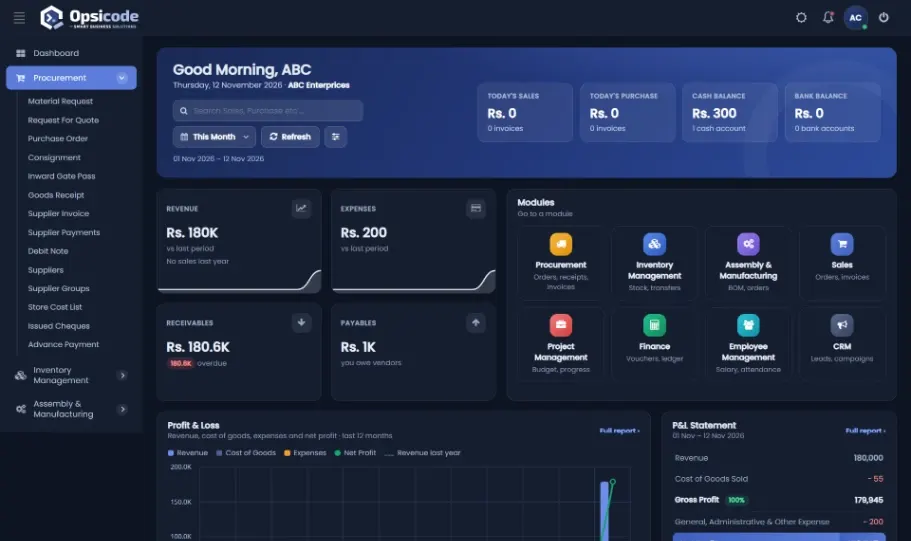
Dashboard — dark mode
Light or dark — work the way you like
Switch the whole ERP between light and dark mode from the top bar. Every dashboard, list and form follows.
- One click to switch between light and dark
- The same dashboard, KPIs and charts in both modes
- Comfortable for long working days and night shifts
Works with
Connected to the rest of your business
Every Opsicode ERP module shares the same live data. These are the modules it works with most closely.
See Company Setup & Administration in a live demo
Book a free, no-obligation demo. Online, from anywhere in the world — we will walk you through the system using examples from your own industry.